Administration / Integration-dependent

Company Email & Mailboxes

Manage company mail domains, mailbox requests and provider-confirmed status through an authorized Company Email dashboard.
Customer Super AdminAuthorized Company Email Admin

What it is designed to manage

  • Company-scoped mail domains and mailbox records
  • Validated mailbox-name provisioning requests
  • Mailbox request and status dashboard
  • Provisioning event history and provider confirmation
  • Company-specific incoming and outgoing email direction
  • Automated provisioning through an authorized mail provider
  • Company domain ownership challenge
  • Per-mailbox read and send delegation
  • Unsent drafts and outbound queue
  • Stored inbox and trusted inbound foundation
  • Secure SMTP transport adapter
  • Bounded retry and ambiguous outcomes
  • Incoming / outgoing mail
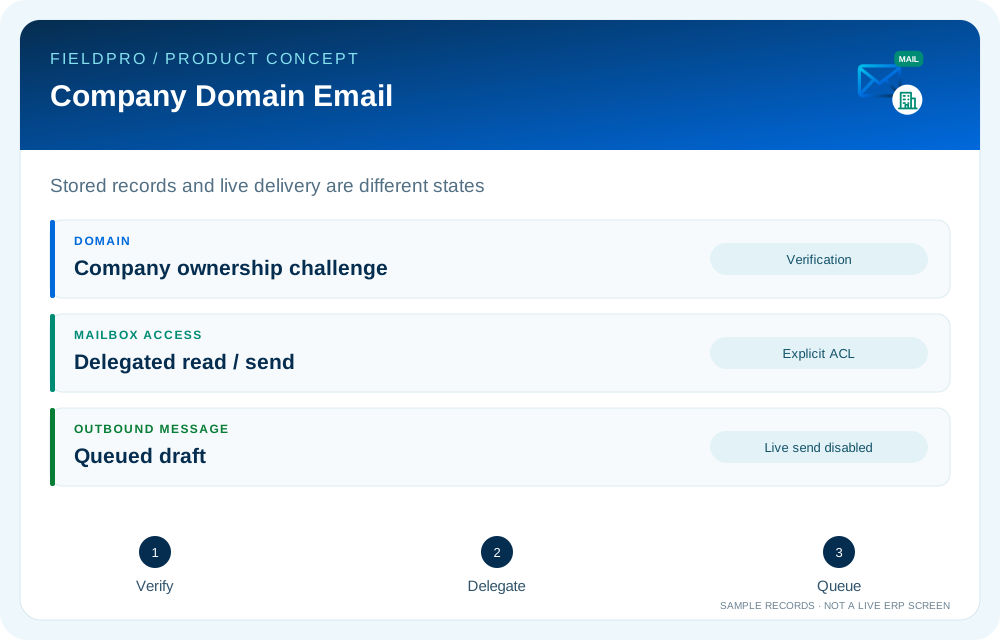
FieldPro Company Email & Mailboxes design concept
Design concept with sample records; not a live ERP screenshot.
Tasks 29–38 supersede the earlier request-only description with mailbox ACL, stored inbox, drafts/queue, provider interfaces and an SMTP adapter. Provisioning and delivery workers remain fail-closed for live operations. Office Mail and Messenger are documented separately.
Feature-by-feature availability

What is in source, planned or awaiting integration.

  • Company mail data and validated requestsSource added

    Company domains, mailboxes, provisioning events and a company-bound mailbox-request service are recorded.

  • Company Email dashboardSource added

    Responsive domain/mailbox/status/request interface uses authorized backend routes and does not expose provider credentials.

  • Automated mailbox provisioningIntegration required

    Connect the authorized domain and cPanel/mail provider, then confirm mailbox existence before activation.

  • Incoming / outgoing mailSource foundation · integration pending

    Inbox storage, drafts, queue and transport foundations now exist in source. Real provider provisioning, automatic inbound sync and end-to-end send/receive remain pending.

  • Portfolio-wide company listingIntegration required

    Reconcile the new account/company portfolio with legacy company permissions before relying on the dashboard.

  • Company domain ownership challengeSource present · live validation pending

    Create a DNS TXT challenge with a 24-hour validity and verify the registered company domain. Domain verification does not itself create a mailbox.

  • Per-mailbox read and send delegationSource present · live validation pending

    Company administrators assign mailbox-specific read/send grants. Draft creation and stored inbox access follow the corresponding mailbox ACL.

  • Unsent drafts and outbound queueSource present · live validation pending

    Create a draft and queue it using authorized mailbox access. Queued is distinct from sent or delivered.

  • Stored inbox and trusted inbound foundationSource present · live validation pending

    Read stored headers/body with mailbox ACL. A trusted connector importer has tenant checks, message-ID deduplication and per-mailbox sync state; automatic IMAP sync is not connected.

  • Secure SMTP transport adapterSource adapter · live sending disabled

    A callable encrypted SMTP adapter and credential-reference validation are present. The existing worker remains disabled for live sends until provider/ownership checks and staging integration are completed.

  • Bounded retry and ambiguous outcomesSource present · live validation pending

    Operator requeue and retry foundations avoid automatically repeating ambiguous SMTP outcomes. SMTP acceptance is not proof of inbox delivery.

Permissions & security requirements.

  • Mailbox operations require authorized company context; client-entered company IDs do not grant access.
  • Provider credentials remain server-side; domain ownership and reserved names must be checked.
  • Requests need retry/idempotency controls and audit events; provider activation must be confirmed before showing active status.

Related role applications.

Module access follows assigned rights. Application package releases and live connections are separate.

A practical view of the process

How the work moves.

01

Select an authorized company and verified mail domain

02

Request a validated mailbox name

03

Queue provisioning using company-bound context

04

Authorized worker requests provider provisioning

05

Activate only after provider confirmation

06

Connect company inbox and outbox through configured mail services

Information coming in

  • Authorized account/company context
  • Verified mail domain
  • Mailbox name request
  • Secured provider credentials

Records & handoffs coming out

  • Mailbox request and status record
  • Provisioning events
  • Provider-confirmed activation when integrated
Connected departments

Where this module connects.

Integration-dependent. Release availability requires the relevant implementation, integration and validation work. The visual above is illustrative.

Start with your business

Map your teams.
Connect your workflow.

Explore the departments and handoffs that match your operation, then prepare a product enquiry around your company structure.