Administration / In development

Super Admin & Company Setup

Set up companies, branches and the responsibilities that keep business data in the right hands.
Master Super AdminCompany Super Admin

What it is designed to manage

  • Multi-Company Management
  • Branches / Offices / Locations
  • Users, Roles & Permissions
  • Department Configuration
  • System Settings & Preferences
  • Activity Logs & Audit Trail
  • Data Backup & Restore
  • Email / SMS / WhatsApp Settings
  • Security & Two-Factor Authentication
  • Custom Fields & Workflows
  • Company and branch structure
  • Granular view, create, edit, approve, delete, export and manage permissions
  • Explicit, audited authorization for support access
  • Company-scoped records and shared services
  • Employee invitation listing and pending-invite revocation
  • Invite-based inactive account registration foundation
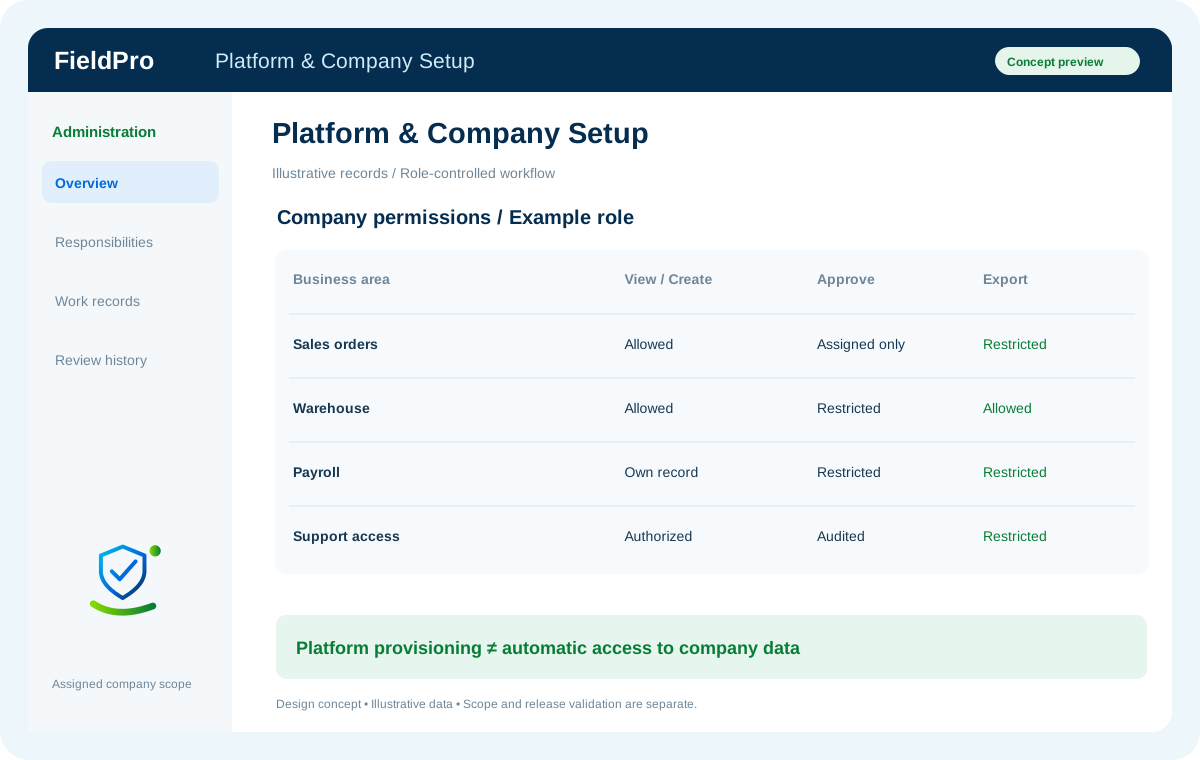
FieldPro Super Admin & Company Setup design concept
Design concept with sample records; not a live ERP screenshot.
Feature-map status: Developed (Core). This status is reported in the supplied map; it is not a claim of independent live-release verification. Master Super Admin manages the platform. Access to company data requires explicit, audited support authorization; it is not automatic.
Feature-by-feature availability

What is in source, planned or awaiting integration.

  • Multi-Company ManagementReported Developed (Core)

    Manage separately authorized companies inside the customer portfolio.

  • Branches / Offices / LocationsReported Developed (Core)

    Connect each operating location to its company and assigned managers.

  • Users, Roles & PermissionsReported Developed (Core)

    Assign view, create, edit, approve, export and administration rights explicitly.

  • Department ConfigurationReported Developed (Core)

    Define which teams own requests, records and approvals.

  • System Settings & PreferencesReported Developed (Core)

    Keep business configuration tied to the selected company.

  • Activity Logs & Audit TrailReported Developed (Core)

    Review important changes and the responsible actor.

  • Data Backup & RestoreReported Developed (Core)

    Protect company data with authorized backup and recovery procedures.

  • Email / SMS / WhatsApp SettingsReported Developed (Core)

    Configure the relevant provider and company notification identity.

  • Security & Two-Factor AuthenticationReported Developed (Core)

    Scope authentication and sensitive account controls to authorized users.

  • Custom Fields & WorkflowsReported Developed (Core)

    Configure business-specific fields and approval paths.

  • Company and branch structureIn development
  • Granular view, create, edit, approve, delete, export and manage permissionsIn development
  • Explicit, audited authorization for support accessIn development
  • Company-scoped records and shared servicesIn development
  • List and revoke employee invitationsSource added

    Company/account-scoped invitation listing and pending-invite revocation require active Customer Super Admin authorization.

  • Invite-based registration foundationSource added / incomplete

    Invitation-token validation creates an inactive account; verification must precede membership, role access or login.

  • Verified employee activationPlanned / integration required

    Email delivery and mailbox-control verification, abuse controls and registration page remain pending.

  • Employee invitation listing and pending-invite revocationPreviously documented scope

    Retained from the earlier FieldPro scope; release availability is reviewed separately.

  • Invite-based inactive account registration foundationPreviously documented scope

    Retained from the earlier FieldPro scope; release availability is reviewed separately.

Related role applications.

Module access follows assigned rights. Application package releases and live connections are separate.

A practical view of the process

How the work moves.

01

Provision company

02

Define branch structure

03

Assign department roles

04

Review access

Information coming in

  • Company structure
  • Authorized administrators

Records & handoffs coming out

  • Company workspace
  • Role and permission matrix
Connected departments

Where this module connects.

In development. Release availability requires the relevant implementation, integration and validation work. The visual above is illustrative.

Start with your business

Map your teams.
Connect your workflow.

Explore the departments and handoffs that match your operation, then prepare a product enquiry around your company structure.